
Why doesn't Confluence Cloud have a native HTML macro?
Share on socials
Why doesn't Confluence Cloud have a native HTML macro?
Jump to Section
Jump to section
Why isn't there a native HTML macro?
Using HTML, CSS & JS in Cloud
Get secure HTML with Mosaic
- Benefits
- How it works
- Safety tips
Explore why HTML isn't built into Confluence Cloud, and how you can still add scripts and markup securely to your Confluence pages.
Whether you're new to the Confluence ecosystem and looking for greater customisation, or you've recently migrated from Data Center and want to replicate your previous setup, you're probably wondering why there's no built-in support on the cloud platform.
You're not alone in that thought (that's why we've written this article!), and we're here to give you a solution that'll keep your Confluence secure.
Why isn't there a native HTML macro in Confluence Cloud?
HTML is powerful: it can change how pages behave, run scripts, and interact with data. But in a shared cloud environment like Confluence Cloud, allowing unrestricted HTML and JavaScript (JS) can create serious security and reliability risks.
Without the right security measures, users could run unsafe scripts that:
- Break page layouts.
- Expose sensitive information.
- Create unpredictable behaviour for other users.
How can you use HTML, CSS, and JS in Confluence Cloud?
Atlassian's Marketplace model allows it to "transfer" accountability for developing this macro to trusted vendors, such as Kolekti. They require vendors to implement strict security policies and data protection measures, such as admin-controlled features, sandboxing, and sanitisation.
This means:
- Apps must isolate and control how code runs.
- Unsafe behaviour must be blocked.
- Vendors are responsible for protecting customers.
Discover Mosaic's HTML macro: HTML, CSS, and JS with a security-first approach
With Mosaic for Confluence, you can enjoy dynamic content on your Confluence pages without the security risk.
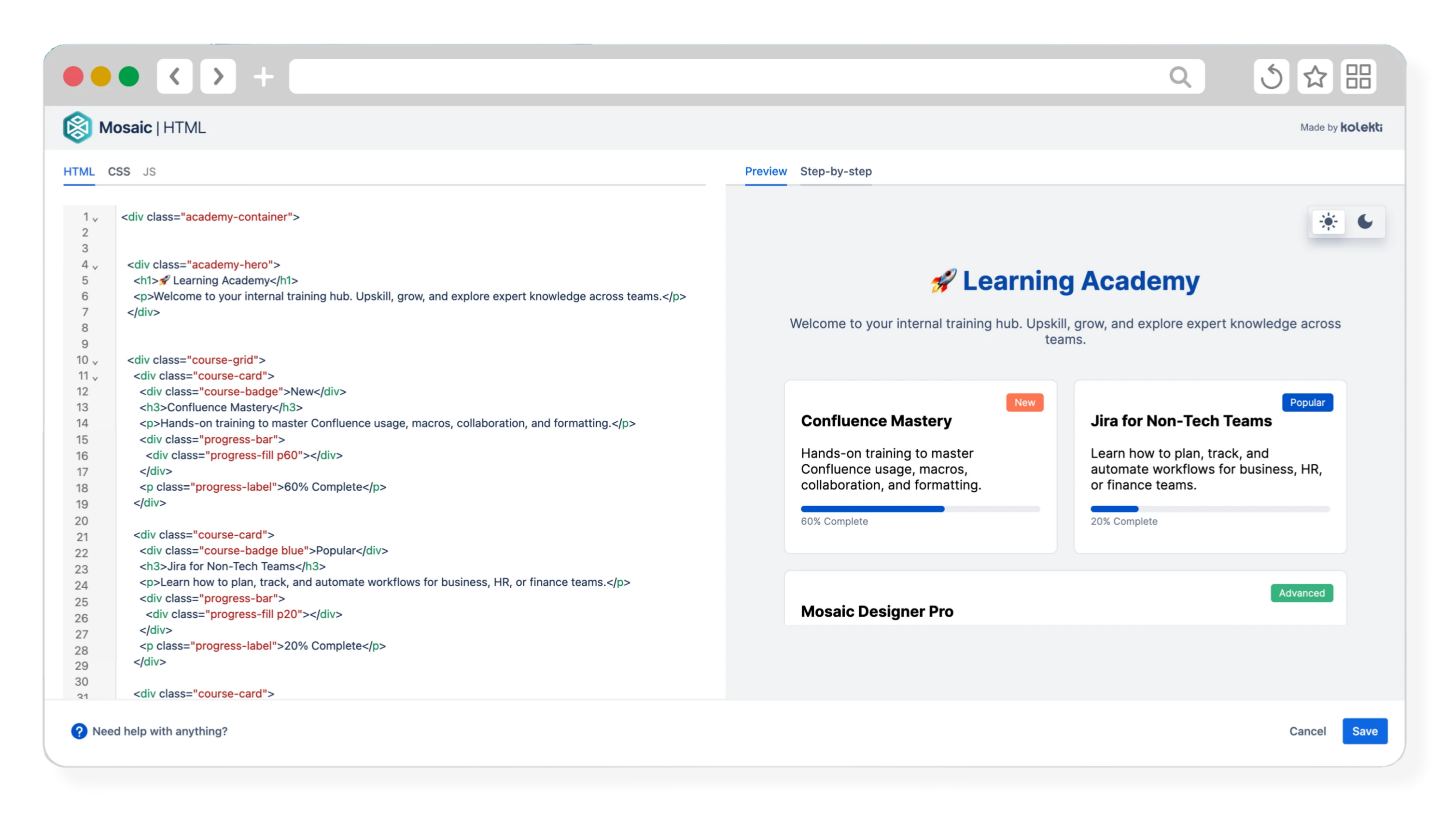
Mosaic's HTML macro runs within the Confluence page context. It doesn't override Confluence permissions, access restricted content outside the viewer's access, or replace Atlassian's security controls.
All Mosaic users can enjoy HTML and CSS as standard. JavaScript support is exclusive to Mosaic Advanced Edition, as it provides additional layers of security protection for customers.
Explore Mosaic Advanced Edition or get your 30-day free trial:
What are the benefits of using Mosaic's HTML macro?
How you present your Confluence page affects how readers engage with it. If you're looking to boost engagement and ensure your content actually gets read, Mosaic's HTML macro helps you:
- Build layouts that actually match the purpose of your content.
- Go beyond Confluence's native formatting – control spacing, alignment, and structure.
- Create interactive elements to help users focus on what matters.
Most importantly, Mosaic's HTML macro comes with unparalleled security, so you can enjoy custom layouts without fear. Kolekti is a Platinum Marketplace Partner, and our apps are ISO 27001 certified, meaning you can rest assured that we're committed to keeping your content and Confluence safe.
So, how does Mosaic's HTML macro work?
The HTML macro runs HTML and JavaScript in a controlled, isolated environment that blocks unsafe scripts and behaviours by default. This:
- Prevents access to sensitive Confluence data.
- Ensures pages render consistently for all users.
- Applies sanitisation controls to prevent unsafe injections.
Mixing HTML, CSS, and scripts in one place makes it easier for unsafe code to slip in. We've designed the macro with separate tabs for HTML, CSS, and JavaScript, which ensures safety rules are applied to each layer, restricting what JavaScript can do and preventing scripts from interfering with your page content or Confluence itself.
Tips to further reduce risk when working with HTML macro:
Rest assured, your data is safe with Mosaic. But it never hurts to be mindful of the scripts you add to your content. For complete peace of mind:
- Avoid loading untrusted external scripts.
- Don’t embed unknown third-party libraries.
- Keep scripts self-contained and minimal.
- Review any reusable templates before sharing widely.
We're thrilled to bring custom, interactive, and secure content to your Confluence site. So what are you waiting for?

Get started with HTML today
Enjoy HTML, CSS, and JS with Mosaic Advanced Edition. Get your 30-day free trial and see the difference it makes:

Written by

Senior Product Marketing Manager
As Senior Product Marketing Manager at Kolekti, Linh brings over 13 years of experience in product management and marketing, with over seven years dedicated to building and growing solutions within the Atlassian ecosystem. She is passionate about helping teams work efficiently using tools like Confluence and Jira.