
Compare Mosaic for Confluence
While we believe Mosaic is the best Confluence page design tool, you might be considering an alternative. So, what’s the best fit for your team?
Best for: All-in-one content formatting and curation
Mosaic gives teams a complete suite of content formatting macros, templates, and space management in a single app, no add-ons needed. It's perfect for teams that want simple yet powerful page design and bulk content creation capabilities without multiple tools or extra costs.

Aura
Great for: Sleek and static landing pages
Aura lets teams create polished, visually appealing Confluence pages using a single-macro approach. Using its full page-building capabilities requires an additional paid companion app, making it a good fit for design-focused teams with flexibility in their app budget.

Refined
Great for: Branded pages without custom code
Refined helps organisations apply consistent branding and theming across their Confluence spaces without needing HTML or custom code. You’ll need a second companion app to enjoy the full page-design experience, making it a good fit for teams that don’t mind a little extra complexity.
Optics
Great for: Standout Confluence slide decks
Optics enables users to create presentation-style layouts and visually rich static content directly within Confluence. It's well-suited to teams who want to build eye-catching slide decks without switching to external tools.

Capable
Great for: Technical teams and documentation
Capable adds core diagramming and markdown tools to Confluence. It's suited to teams that lean toward the technical side and don’t need additional visual branding and templates.
Best for: All-in-one content formatting and curation
Mosaic gives teams a complete suite of content formatting macros, templates, and space management in a single app, no add-ons needed. It's perfect for teams that want simple yet powerful page design and bulk content creation capabilities without multiple tools or extra costs.
Great for: Sleek and static landing pages
Aura lets teams create polished, visually appealing Confluence pages using a single-macro approach. Using its full page-building capabilities requires an additional paid companion app, making it a good fit for design-focused teams with flexibility in their app budget.
Great for: Branded pages without custom code
Refined helps organisations apply consistent branding and theming across their Confluence spaces without needing HTML or custom code. You’ll need a second companion app to enjoy the full page-design experience, making it a good fit for teams that don’t mind a little extra complexity.
Great for: Standout Confluence slide decks
Optics enables users to create presentation-style layouts and visually rich static content directly within Confluence. It's well-suited to teams who want to build eye-catching slide decks without switching to external tools.
Great for: Technical teams and documentation
Capable adds core diagramming and markdown tools to Confluence. It's suited to teams that lean toward the technical side and don’t need additional visual branding and templates.
Best for: All-in-one content formatting and curation
Mosaic gives teams a complete suite of content formatting macros, templates, and space management in a single app, no add-ons needed. It's perfect for teams that want simple yet powerful page design and bulk content creation capabilities without multiple tools or extra costs.
Great for: Sleek and static landing pages
Aura lets teams create polished, visually appealing Confluence pages using a single-macro approach. Using its full page-building capabilities requires an additional paid companion app, making it a good fit for design-focused teams with flexibility in their app budget.
Great for: Branded pages without custom code
Refined helps organisations apply consistent branding and theming across their Confluence spaces without needing HTML or custom code. You’ll need a second companion app to enjoy the full page-design experience, making it a good fit for teams that don’t mind a little extra complexity.
Great for: Standout Confluence slide decks
Optics enables users to create presentation-style layouts and visually rich static content directly within Confluence. It's well-suited to teams who want to build eye-catching slide decks without switching to external tools.
Great for: Technical teams and documentation
Capable adds core diagramming and markdown tools to Confluence. It's suited to teams that lean toward the technical side and don’t need additional visual branding and templates.
Mosaic: #1 most popular content formatting app
Discover Mosaic's features
Macros for all teams
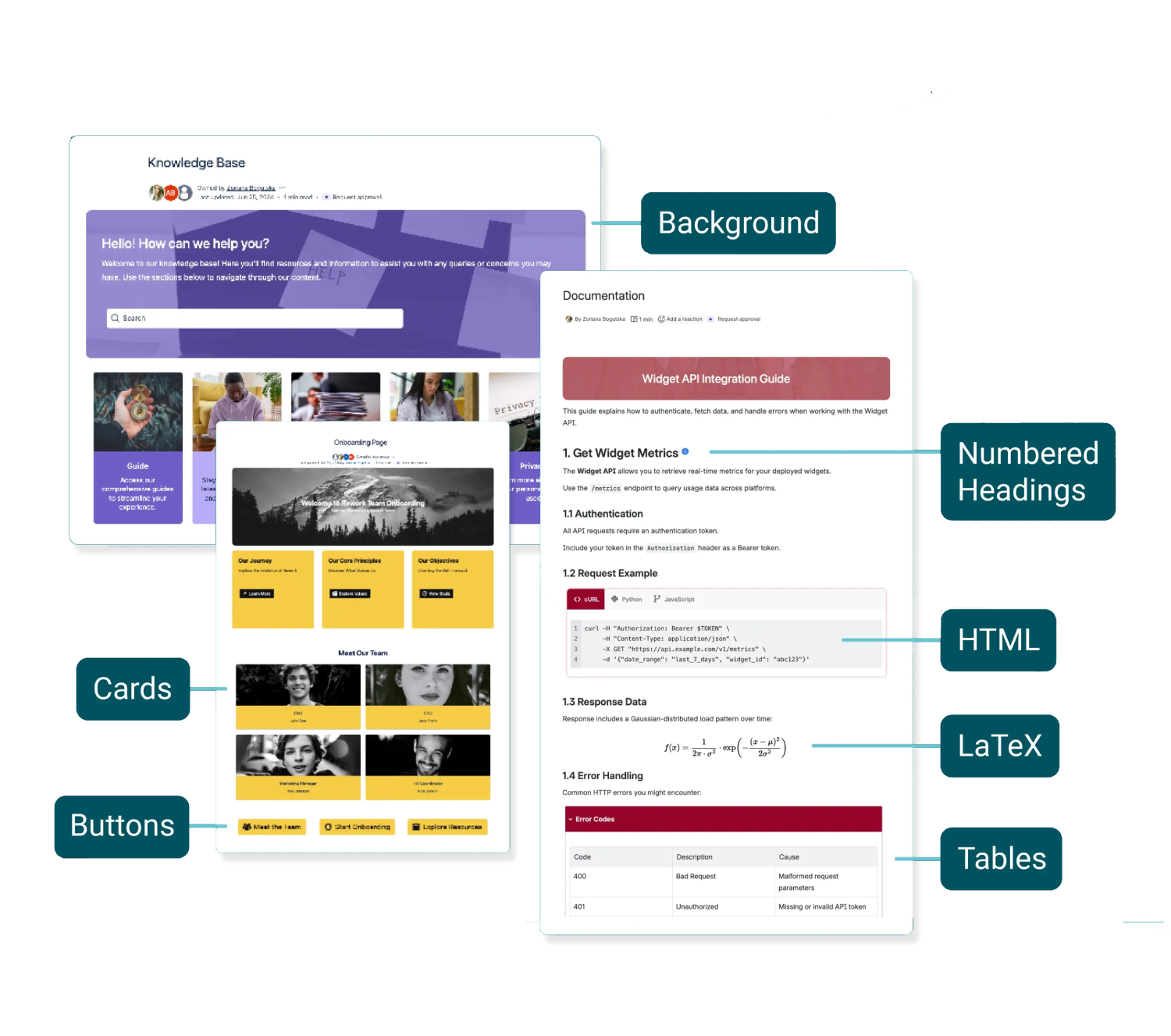
Mosaic comes with a powerful macro toolkit designed for technical and non-technical teams alike.
From Tabs, Buttons, and Advanced Cards to Numbered Headings and LaTeX, you can create technical documentation, fully-branded intranets, and everything in between.
From Tabs, Buttons, and Advanced Cards to Numbered Headings and LaTeX, you can create technical documentation, fully-branded intranets, and everything in between.
Flexible, stylish templates
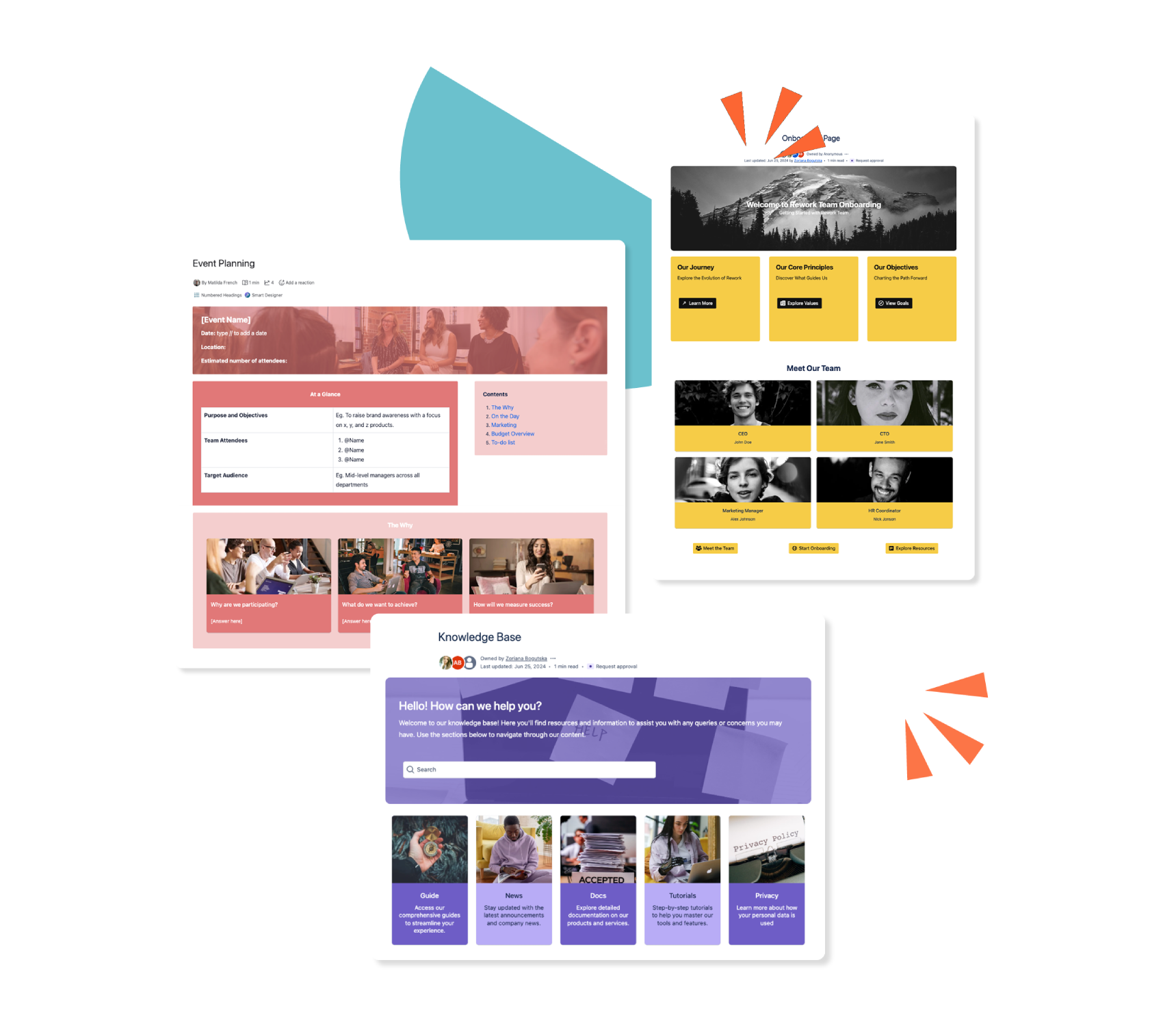
With Mosaic, you can enjoy a library of full-page templates for the most popular use cases, from documentation and onboarding to FAQs. Mosaic's templates are fully customisable, so you can mix and match Confluence's native elements and other macros and tailor them to your exact needs.
Create pages faster with Smart Designer
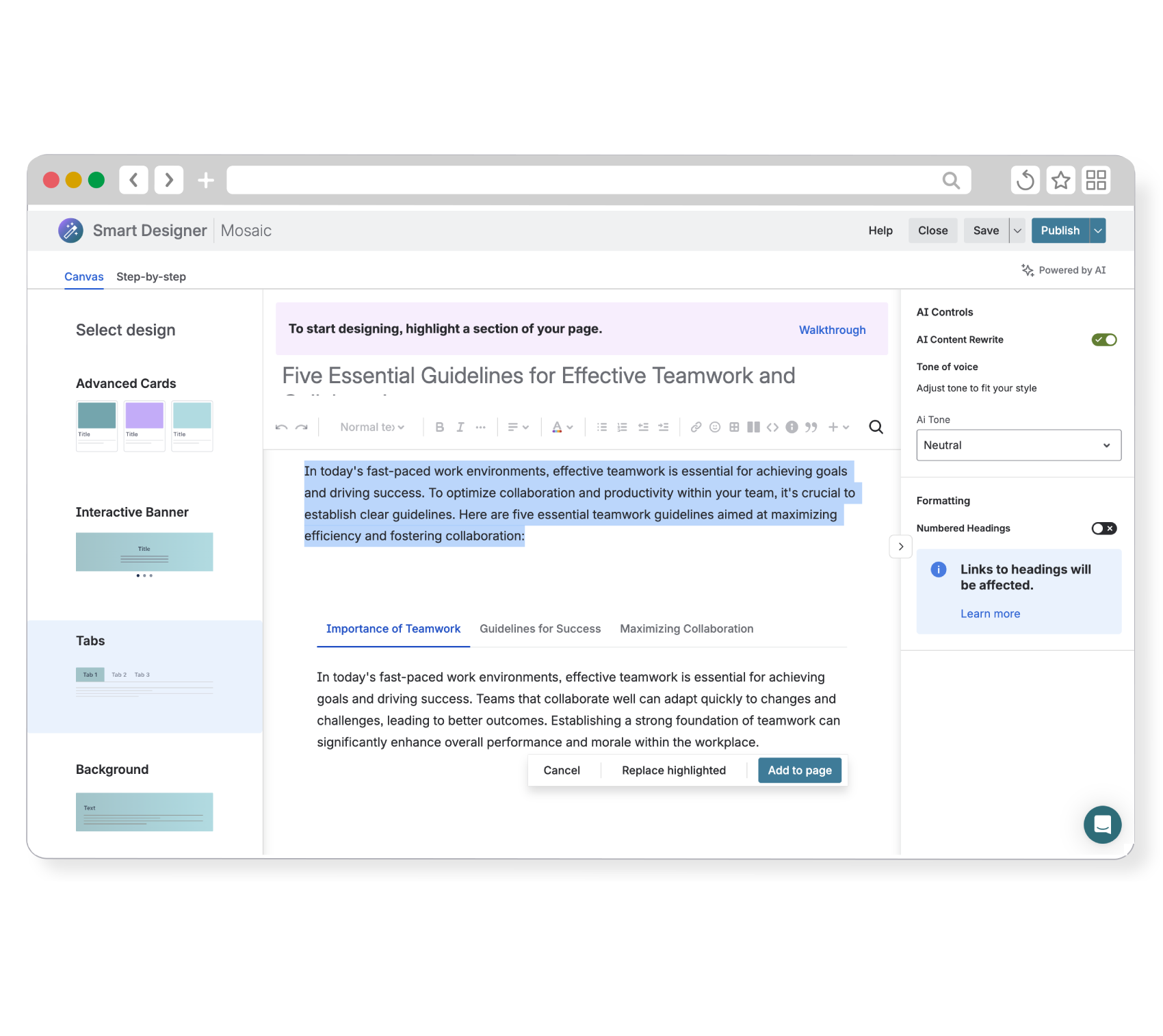
Smart Designer is Mosaic’s game-changing design wizard, letting you transform walls of text to fully-branded pages in just a few clicks.
With Smart Designer always in reach, there's no need to waste time copying and pasting content. And with Confluence’s native editing tools and formatting built-in as standard, you don’t need to switch between editors to achieve the look you want.
Custom content with no compromise on security
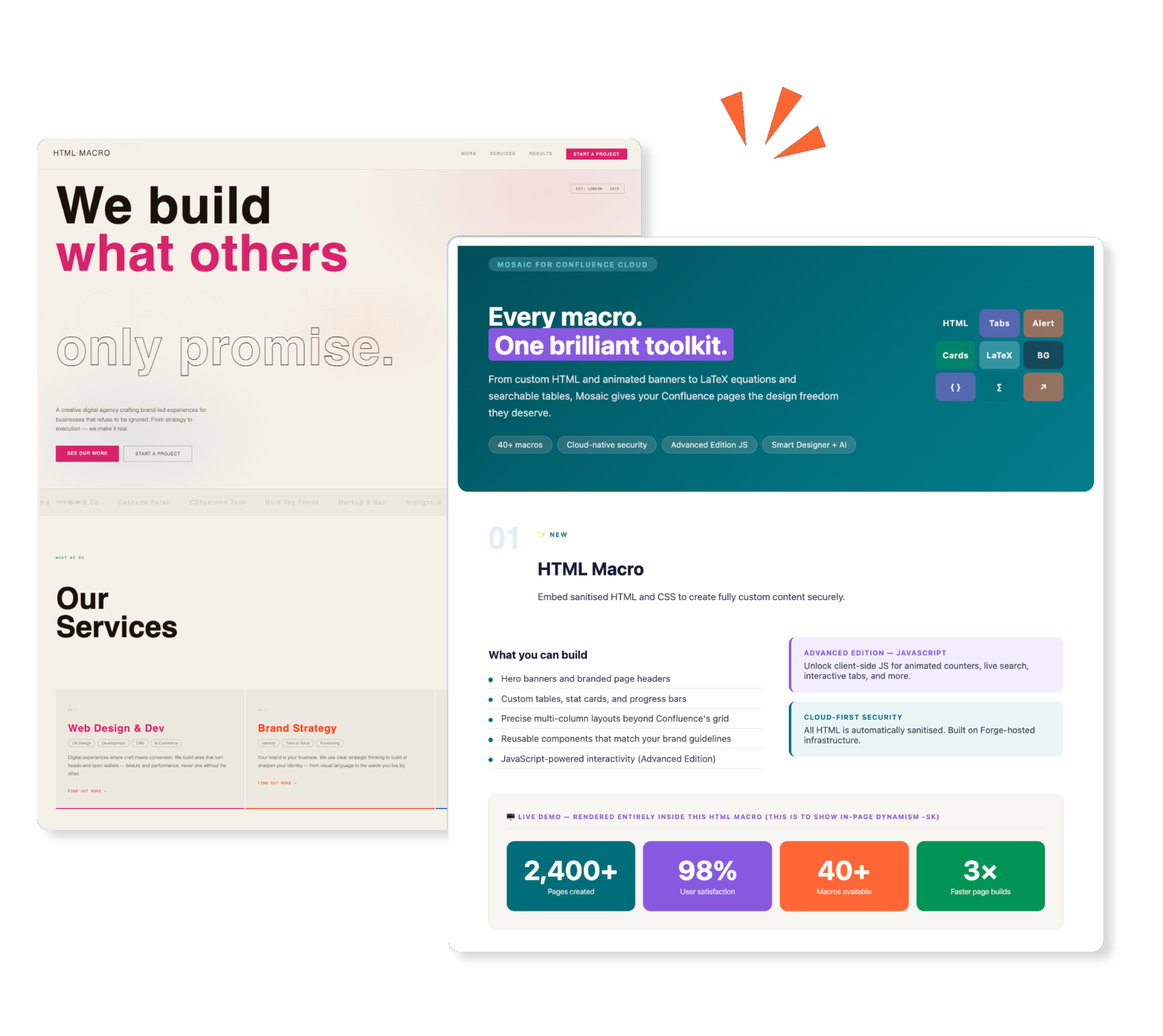
Mosaic’s HTML macro runs in a controlled, isolated environment, blocking unsafe scripts and behaviours as standard. Mosaic also supports importing your own code and gives you access to an extensive built-in library of presets, making custom creation faster than ever.
Enjoy secure HTML and CSS in Mosaic Standard Edition and unlock fully sanitised JavaScript too as part of Mosaic Advanced Edition.
Enjoy secure HTML and CSS in Mosaic Standard Edition and unlock fully sanitised JavaScript too as part of Mosaic Advanced Edition.
Scale content management and creation
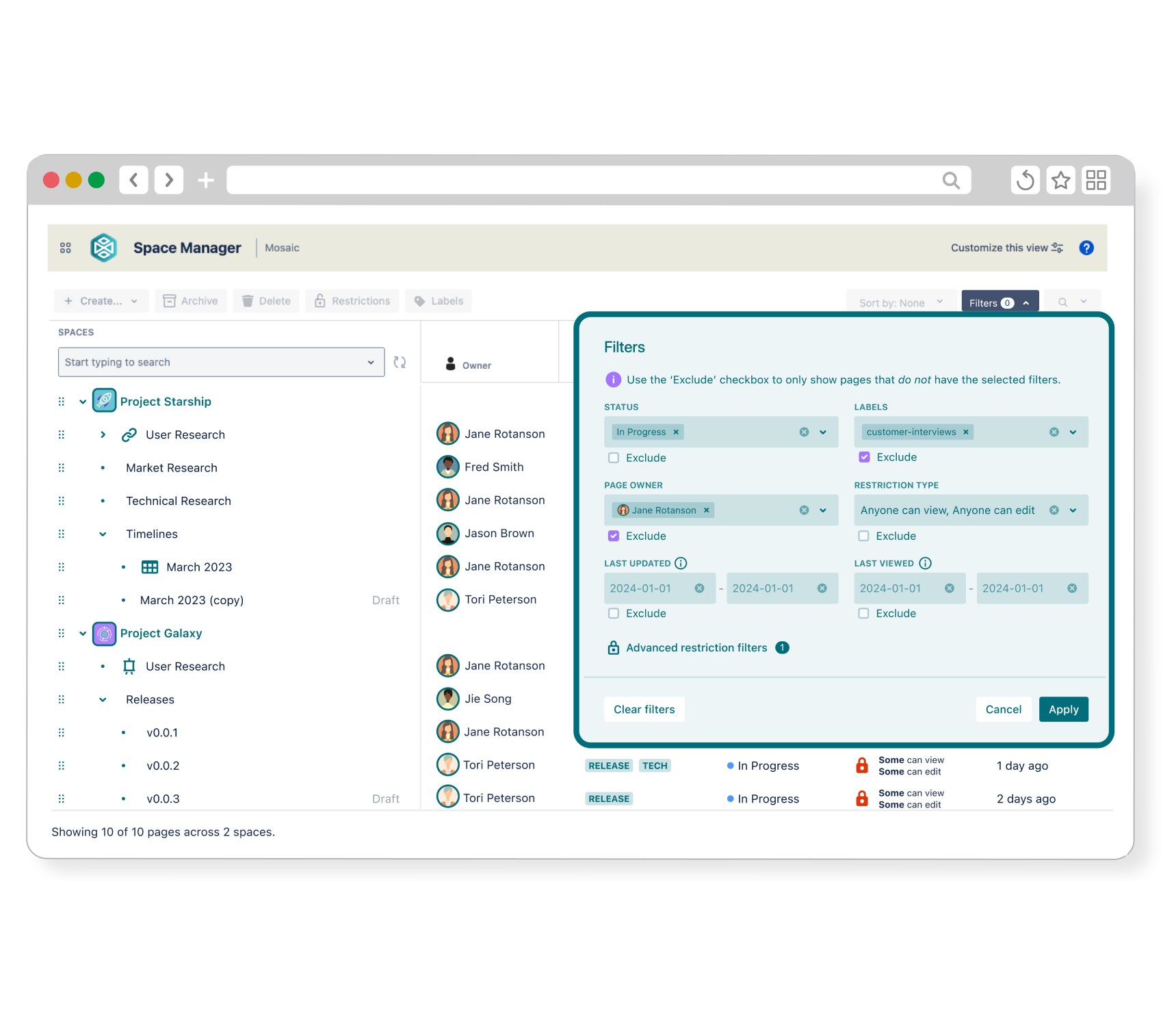
Mosaic's Space Manager lets you view, manage, delete, and create hundreds of pages at once. Update labels and restrictions, filter content, and design clear hierarchies from one central place, saving you so much time and energy.
Enjoy Space Manager’s full toolset as part of Mosaic Advanced Edition.
Mosaic comes with a powerful macro toolkit designed for technical and non-technical teams alike.
From Tabs, Buttons, and Advanced Cards to Numbered Headings and LaTeX, you can create technical documentation, fully-branded intranets, and everything in between.
From Tabs, Buttons, and Advanced Cards to Numbered Headings and LaTeX, you can create technical documentation, fully-branded intranets, and everything in between.
With Mosaic, you can enjoy a library of full-page templates for the most popular use cases, from documentation and onboarding to FAQs. Mosaic's templates are fully customisable, so you can mix and match Confluence's native elements and other macros and tailor them to your exact needs.
Smart Designer is Mosaic’s game-changing design wizard, letting you transform walls of text to fully-branded pages in just a few clicks.
With Smart Designer always in reach, there's no need to waste time copying and pasting content. And with Confluence’s native editing tools and formatting built-in as standard, you don’t need to switch between editors to achieve the look you want.
Mosaic’s HTML macro runs in a controlled, isolated environment, blocking unsafe scripts and behaviours as standard. Mosaic also supports importing your own code and gives you access to an extensive built-in library of presets, making custom creation faster than ever.
Enjoy secure HTML and CSS in Mosaic Standard Edition and unlock fully sanitised JavaScript too as part of Mosaic Advanced Edition.
Enjoy secure HTML and CSS in Mosaic Standard Edition and unlock fully sanitised JavaScript too as part of Mosaic Advanced Edition.
Mosaic's Space Manager lets you view, manage, delete, and create hundreds of pages at once. Update labels and restrictions, filter content, and design clear hierarchies from one central place, saving you so much time and energy.
Enjoy Space Manager’s full toolset as part of Mosaic Advanced Edition.
Mosaic comes with a powerful macro toolkit designed for technical and non-technical teams alike.
From Tabs, Buttons, and Advanced Cards to Numbered Headings and LaTeX, you can create technical documentation, fully-branded intranets, and everything in between.
From Tabs, Buttons, and Advanced Cards to Numbered Headings and LaTeX, you can create technical documentation, fully-branded intranets, and everything in between.
With Mosaic, you can enjoy a library of full-page templates for the most popular use cases, from documentation and onboarding to FAQs. Mosaic's templates are fully customisable, so you can mix and match Confluence's native elements and other macros and tailor them to your exact needs.
Smart Designer is Mosaic’s game-changing design wizard, letting you transform walls of text to fully-branded pages in just a few clicks.
With Smart Designer always in reach, there's no need to waste time copying and pasting content. And with Confluence’s native editing tools and formatting built-in as standard, you don’t need to switch between editors to achieve the look you want.
Mosaic’s HTML macro runs in a controlled, isolated environment, blocking unsafe scripts and behaviours as standard. Mosaic also supports importing your own code and gives you access to an extensive built-in library of presets, making custom creation faster than ever.
Enjoy secure HTML and CSS in Mosaic Standard Edition and unlock fully sanitised JavaScript too as part of Mosaic Advanced Edition.
Enjoy secure HTML and CSS in Mosaic Standard Edition and unlock fully sanitised JavaScript too as part of Mosaic Advanced Edition.
Mosaic's Space Manager lets you view, manage, delete, and create hundreds of pages at once. Update labels and restrictions, filter content, and design clear hierarchies from one central place, saving you so much time and energy.
Enjoy Space Manager’s full toolset as part of Mosaic Advanced Edition.
DAY-TO-DAY PAGE CREATION
Designed for your everyday
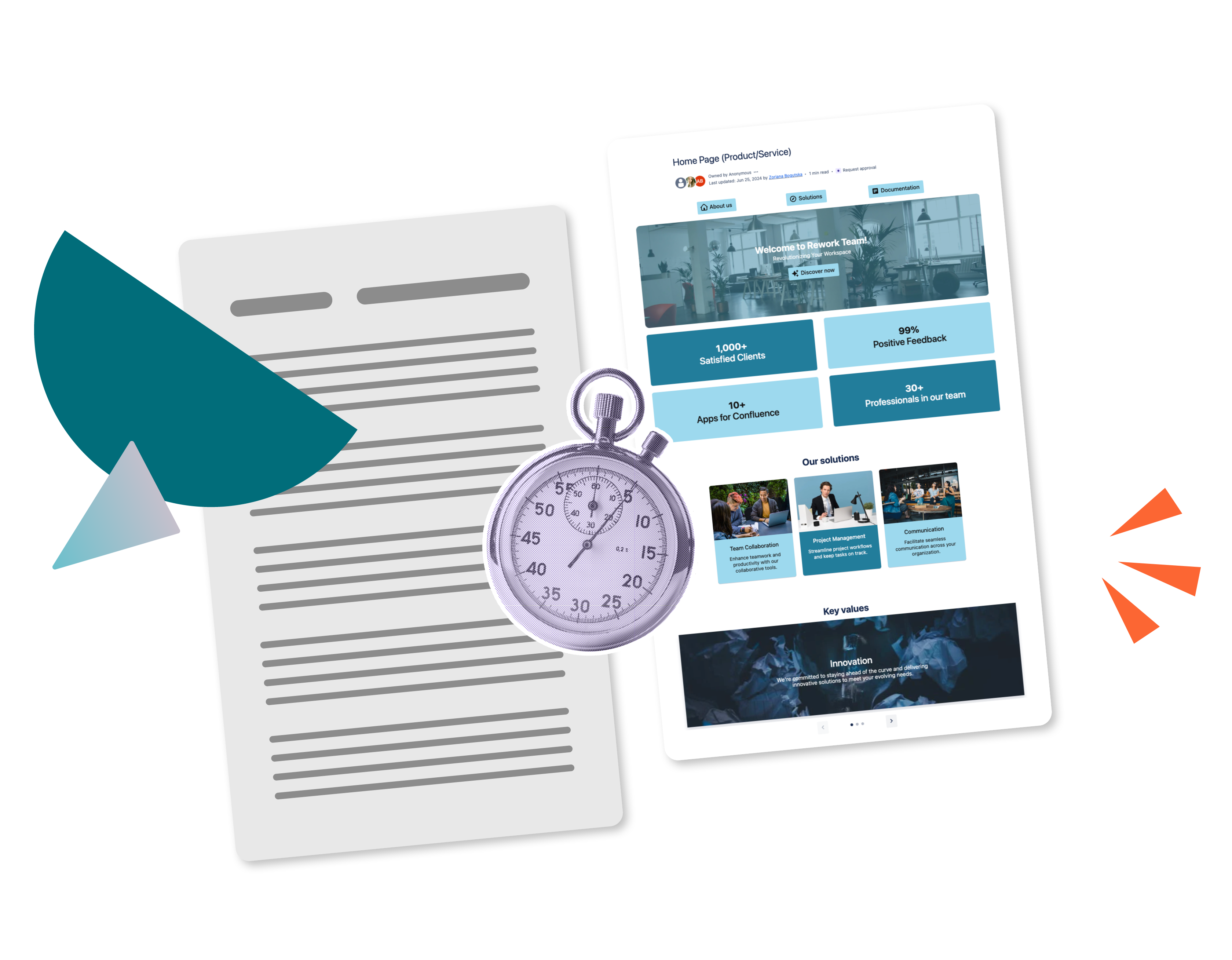
Whether you’re adding macros to a page, transforming content with Smart Designer, or starting with a prebuilt template, Mosaic’s user-friendly toolset lets you create beautiful pages with no design knowledge needed and without any technical know-how. Spend less time on learning and formatting, and more time on work that matters.
CONFLUENCE-FRIENDLY
Built to work with Confluence
Mosaic plays to Confluence's strengths. Its templates and Smart Designer add macros the native way, with each element added as a single macro. Collaboration, editing, and go-to native macros all stay in play, making Mosaic perfect for polishing everyday content.
Unparalleled security
Mosaic is ISO 27001-certified, meets Atlassian’s rigorous compliance requirements, and offers a 24-hour response time guarantee to customers, meaning you can create and curate content with peace of mind.


Try Mosaic for your team
Frequently Asked Questions
Who can benefit from using Mosaic for Confluence?
Mosaic is designed for teams that live in Confluence daily, across any industry.
- If you’re looking for a formatting tool that feels effortless and works with Confluence’s native elements, and you don’t want to dedicate hours to page design, Mosaic is for you.
- If you need one app that works for everyone, from developers writing technical docs to HR teams building onboarding pages, Mosaic is for you.
- If you want an easier way to scale your content management and creation, Mosaic is for you.
Aside from Confluence Cloud, is Mosaic for Confluence available on any other versions of Atlassian?
Yes! For FedRAMP-compliant companies and regulated industries, Mosaic is available for Atlassian Government Cloud and Atlassian Isolated Cloud, respectively.

Want to learn more about Mosaic?
Book a demo with us and get a tailored look at how Mosaic can transform your organisation's Confluence content.