Kolekti home
Join Kolekti and The Adaptavist Group at Team '26 in Amsterdam | 6-8 October
Read more

Migrate to Isolated Cloud with Forms

When you move from Data Center to Atlassian Isolated Cloud, the structured processes your teams depend on - requests, approvals, feedback, intake - need to come with you. Forms for Confluence is built to make that happen.
Three turtles swimming in front of a large purple shape
Moving to Atlassian Isolated Cloud is a significant change, and if your teams rely on forms to run everyday workflows, it's natural to wonder what happens to those processes during the transition. That's exactly why this page exists: to help you understand what the move means for your Forms workflows and give you confidence that nothing gets left behind.

Looking for tailored advice for your organisation? Our team will be delighted to help you - please get in touch.

Migrating Forms? What you need to know

Atlassian is ending support for Data Center products, which means the platform your Forms workflows run on today has a limited future. Now is the time to start planning your move to Isolated Cloud.
Waiting doesn't make migration easier. The longer workflows stay on an unsupported platform, the greater the risk of disruption when you do eventually move. Teams that plan early have more time to test, transition smoothly, and avoid last-minute pressure.
The good news: Forms for Confluence is ready for Isolated Cloud, and your workflows can come with you. Keep reading to understand what the move looks like and how to get started.

The good news: Forms is ready for Isolated Cloud

How teams are already using Forms in Isolated Cloud

Give teams a consistent way to submit service requests, change approvals, and access requests — all captured in Confluence, where they can be tracked and acted on.
A series of three stylised forms representing a poll, user survey, and visualised survey responses
Bring structure to budget requests, expense approvals, and cross-team financial workflows. Every submission follows the same format, every approval has a clear trail.
A series of four stylised forms representing a survey, poll, follow-up survey, and visualised survey responses
Standardise onboarding intake, internal feedback collection, and process requests across your people team. Reduce back-and-forth, capture the right information the first time.
A series of four stylised forms representing an employee onboarding survey, onboarding quiz, satisfaction survey, and visualised survey responses
If a team needs to collect structured information and act on it - whether that's project intake, event requests, or operational reporting - Forms gives them a repeatable, reliable way to do it.
A series of three stylised forms representing an NPS score, user survey, and visualised survey responses
Give teams a consistent way to submit service requests, change approvals, and access requests — all captured in Confluence, where they can be tracked and acted on.
Bring structure to budget requests, expense approvals, and cross-team financial workflows. Every submission follows the same format, every approval has a clear trail.
Standardise onboarding intake, internal feedback collection, and process requests across your people team. Reduce back-and-forth, capture the right information the first time.
If a team needs to collect structured information and act on it - whether that's project intake, event requests, or operational reporting - Forms gives them a repeatable, reliable way to do it.
A series of three stylised forms representing a poll, user survey, and visualised survey responses
A series of four stylised forms representing a survey, poll, follow-up survey, and visualised survey responses
A series of four stylised forms representing an employee onboarding survey, onboarding quiz, satisfaction survey, and visualised survey responses
A series of three stylised forms representing an NPS score, user survey, and visualised survey responses
Give teams a consistent way to submit service requests, change approvals, and access requests — all captured in Confluence, where they can be tracked and acted on.
A series of three stylised forms representing a poll, user survey, and visualised survey responses
Bring structure to budget requests, expense approvals, and cross-team financial workflows. Every submission follows the same format, every approval has a clear trail.
A series of four stylised forms representing a survey, poll, follow-up survey, and visualised survey responses
Standardise onboarding intake, internal feedback collection, and process requests across your people team. Reduce back-and-forth, capture the right information the first time.
A series of four stylised forms representing an employee onboarding survey, onboarding quiz, satisfaction survey, and visualised survey responses
If a team needs to collect structured information and act on it - whether that's project intake, event requests, or operational reporting - Forms gives them a repeatable, reliable way to do it.
A series of three stylised forms representing an NPS score, user survey, and visualised survey responses

What’s better in Isolated Cloud?

A smoother, better user experience

Forms for Atlassian Isolated Cloud is designed to be intuitive from the start. Teams can pick it up quickly without extensive training. Built-in guidance, onboarding resources, and on-demand support are available in-app, so help is always close at hand when you need it.
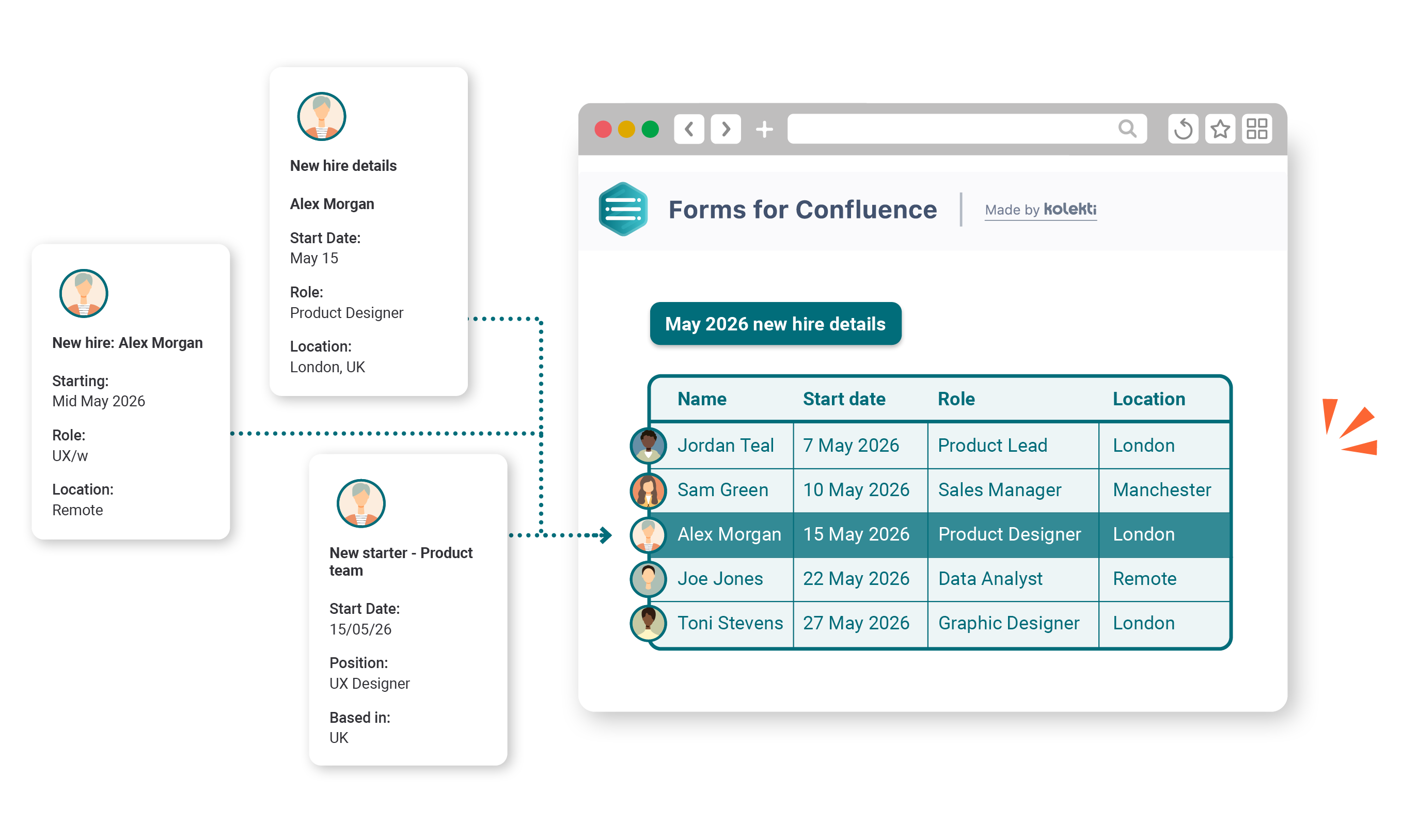
Stylised image showing three different new hire form submissions on the left with arrows pointing to a Forms for Confluence table showing all new hires

Let more teams own their workflows

In Data Center, workflow creation often depends on a small number of specialists or admins. Isolated Cloud makes it easier for teams across HR, Finance, IT, and operations to build and manage their own structured processes — reducing the bottleneck on admins and speeding up workflows.
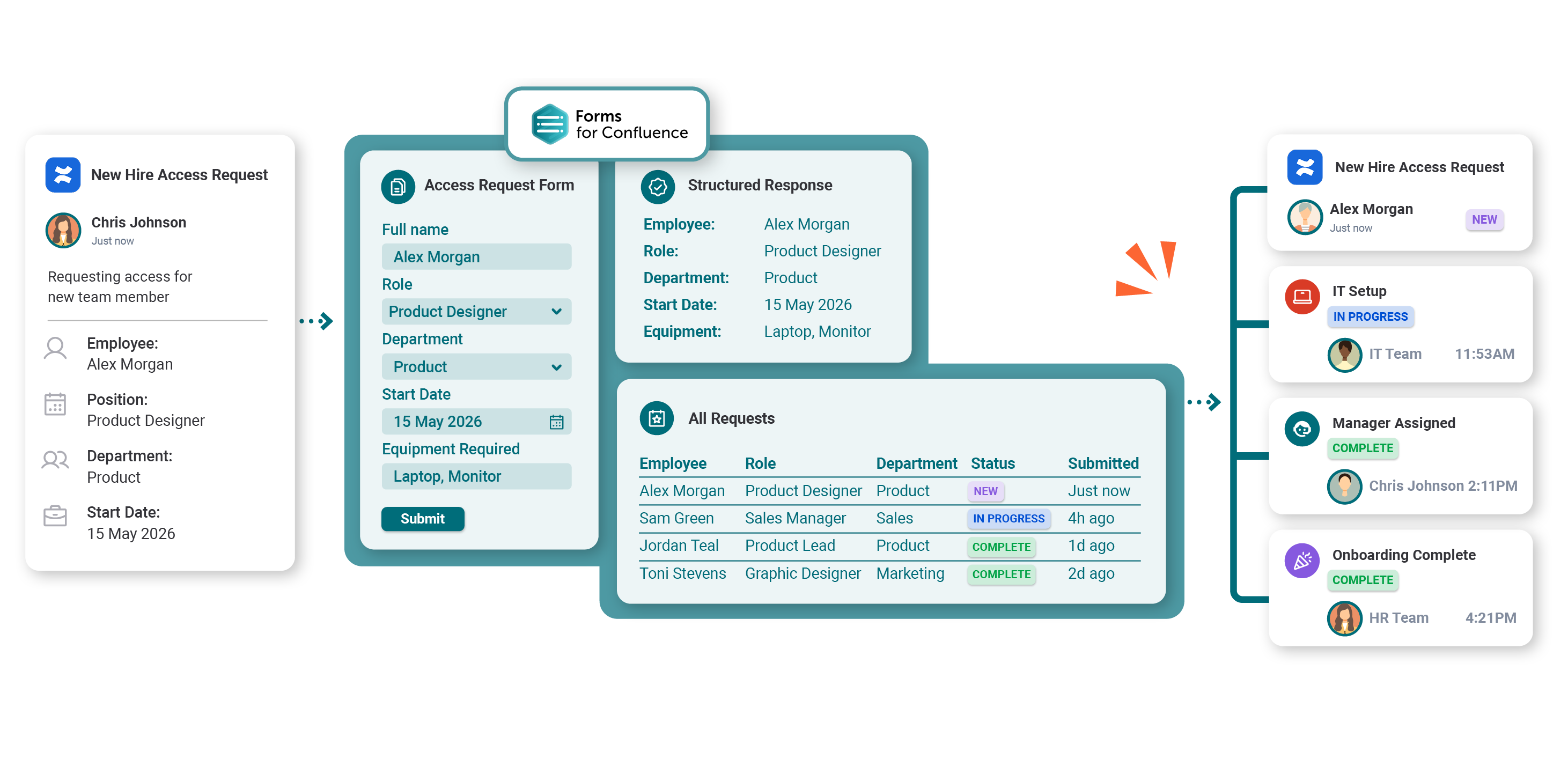
Flow chart-style image showing a request being submitted on the left, a Form in the middle, and an output showing different end results on the right

Secure Forms with extra strength

Forms for Isolated Cloud takes the superior security of Atlassian Isolated Cloud and adds superior functionality on top, giving you peace of mind and a more powerful product than Confluence Data Center.

Feature comparison

Forms for Isolated Cloud
Forms for Confluence DC
Email notifications

Removed for complete security
A variety of form question fields
Anonymous responses option
In-page response tables and visualisations
⚠️
Basic visualisations only
Embedded multi-form visualisation
Polls
Quizzes
Jira task forms
(Create Jira work items from form submissions)
⚠️
Requires ScriptRunner for Confluence
Improved user experience
Enterprise-ready security
Live in-app support

How to migrate Forms for Confluence

Not sure where to start? We’ve put together some pointers to support you.

Your four-phase migration approach

Click a card to learn what you need to do at each step of the journey.

Your Forms for Isolated Cloud migration cheatsheet

Get all the foundational information you need on one page. Download your free guide to get started and migrate to Isolated Cloud with confidence.
A flock of geese flying to the right

Ready to plan your move?

Whether you're early in your migration planning or already underway, we’re here to help you transition your Forms workflows with confidence.

Looking to migrate from another Confluence forms app? We can help

Why organisations choose Forms for Confluence

Not all form apps are built the same. Many focus on narrow use cases, need an admin to configure, and get complicated fast. That works up to a point, but it doesn't help when you need workflows to empower whole teams to work independently.
Where other apps add friction, Forms for Confluence removes it. Anyone on your team can create, manage, and respond to forms without specialist knowledge. Workflows are simple to set up and quick to roll out, so there's less time spent configuring and more time spent on actual work.
Stylised image showing data from different sources, such as Gmail, Slack, and Confluence, being linked in one place via Forms for Confluence

Security-first for your peace of mind

Unlike other form apps such as ConfiForms, Forms for Confluence is ISO/IEC 27001 and SOC 2 certified, demonstrating our unparalleled commitment to your security.
AICPA SOC 2 badge
BSI ISO/IEC 27001 certified badge
Platinum Marketplace Partner
100% on Forge
It's a much more intuitive application than other form or poll apps we have used.
Phil Cooper
Atlassian Marketplace Review

Proven at enterprise scale

Switching forms apps is a big decision, especially for large organisations with complex workflows and strict compliance requirements. Forms for Confluence has already helped enterprise-level companies successfully make that move.
One global software company has already transitioned from Confiforms to Forms for Confluence in preparation for its move to Isolated cloud, a move that required meeting demanding standards around data handling, workflow continuity, and user adoption. Forms delivered, giving their teams a modern, cloud-native solution without losing the functionality they relied on.
A rocket with the Atlassian logo flying through two clouds
A headshot of Customer Success Manager Abi Brown

Move to Forms with confidence


I’m Abi, Kolekti’s Senior Customer Success Manager.
If you're considering a move from your current forms app, you're not starting from scratch. There's a proven path forward, and we’re here to support you.

FAQs

It depends on what version of Confluence you’re currently on. If you’re not on Confluence 9.0.0 - 9.5.4 or any Confluence 10 version, we recommend you update your Confluence instance.
The following checklist will help ensure you’re ready for your migration:
  • Set all form types to Internal Database (single destination).
  • Remove all non-form macros from inside your Forms macros.
  • Remove or replace unsupported form fields.
  • Ensure you are using the recommended versions of Confluence and Forms for Confluence.
    • Confluence: Confluence 9.0.0 - 9.5.4, or any Confluence 10 version
    • Forms: Forms for Confluence 9.0.10, or Forms for Confluence 10.0.00 and above
  • Perform a test migration using Atlassian’s Cloud-hosted Migration Assistant so you know what to expect. Forms that worked in DC often need post-migration editing in Atlassian Isolated Cloud.
If the issue is with app-specific functionality, e.g., forms data isn’t importing, forms appear empty, or there are configuration problems, open a ticket with us.
When the root cause points to the Atlassian platform infrastructure, e.g., APIs are returning incorrect results, or there are bugs with the Cloud-hosted Migration Assistant, open a ticket with Atlassian.
If the problem sits at the boundary between our app and the platform, open a ticket with Atlassian and us.
Icon of a white rocket in a purple circle

Need help with migration?

Planning your DC to Isolated Cloud migration? Let's talk about your Forms workflows.